Averages and observation zone
The fast, medium and slow averages appear together. ATR, a measure of recent price range, sets the width of the fast-average zone.
Read the alignment of three moving averages and mark short-MA zone contacts (WATCH) and recoveries (RECOVERY) on closed bars. Adjust the averages, filters and full source code for your own analysis.
TradingView account required. Plans and market data cost extra where applicable. Any applicable tax is shown at checkout.
Refund terms ↗The averages tangle like spaghetti and you can’t tell if it’s an uptrend
It reads the order and slope for you and flags only a real “upward flow”
“A pullback to buy, or the start of a fall?” Your finger shakes every time
A touch of the average shows WATCH; a strong close back above shows RECOVERY
“It’ll come back” — you hold through a bear market and the account halves
When the upward flow ends the marker switches off, so the time to rest in cash is obvious
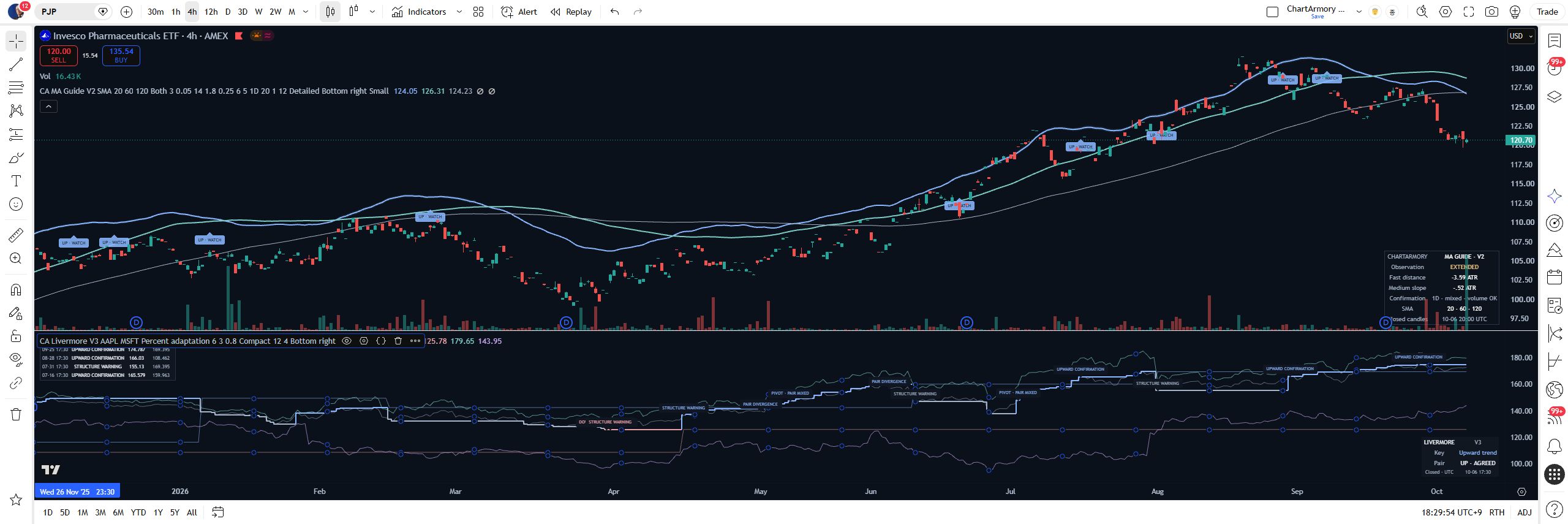
Actual PJP 4H screenshots: averages, observation labels and the reading panel.
The fast, medium and slow averages appear together. ATR, a measure of recent price range, sets the width of the fast-average zone.
WATCH starts an observation. RECOVERY requires the subsequent conditions within the configured lifetime. Neither places an order.
Flow shows the trend state; Distance measures the close from the fast average in ATR units. MIXED means the averages do not form an aligned trend.
| Feature | Existing free editionMA Guide V1 | This source editionMA Guide V2 |
|---|---|---|
| Average types | EMA · SMA | EMA · SMA · WMA · RMA |
| Label filters | No higher-timeframe or volume filter | Matching higher-timeframe trend · volume versus average |
| Panel | Show or hide | Compact · Detailed, position and size |
We replayed the worst sell-offs with one rule: hold only while “upward flow” is on. (Backtest, 0.1% fees included)
2008 crisis, SPY — holding turned $10,000 into $5,150. Following the indicator: −4.4% ($9,560).
2022 bear market, QQQ — holding from the top: $10,000 → $6,630. Following the indicator: −4.6% ($9,540).
2022 Bitcoin — holding: $10,000 → $3,470. No upward flow, so the indicator never bought: 0%.
Complete code TXT + installation guide · TradingView account required
For basic use, paste the supplied complete code into a new Pine Editor script, save and add it to your chart. Change options in Settings. Editing the calculation logic requires Pine Script knowledge.
No. Trend, contact, cooldown and recovery conditions must qualify. Optional filters narrow the conditions; missing volume blocks new WATCH/RECOVERY observations when volume confirmation is enabled.
Settings expose MA types and periods, directions, zone width, recent label count and panel position, size and detail. Changing calculation logic requires Pine Script knowledge.
Yes. Install with Pine Editor in your TradingView account. TradingView plans and market-data fees are not included.
You can edit it for personal use. Sharing, redistribution and resale rights are not included.
No. This is a chart-analysis tool, not a guarantee of trading results or returns.
MA Ribbon already displays multiple averages in one indicator. V2 combines fast-average WATCH/RECOVERY records, optional trend/volume filters, a reading panel and source code for personal editing.
Yes. Observations use closed candles; the higher-timeframe filter uses its previous completed candle. Enabling conditions can reduce or remove labels, not establish better returns.
One-time payment, no renewal. Download from your verified order and delivery email. Platform accounts and market data are separate. A TradingView account, paid plan, market data and invite-only access are not included. Follow platform terms and data entitlements. This license is not platform approval to sell or use the product. This is a chart-observation tool, not investment advice, trade execution or a return guarantee. Losses are possible. Do not base trading decisions solely on the indicator.
TradingView account required. Plans and market data cost extra where applicable. Any applicable tax is shown at checkout.
Past performance does not guarantee future results.
Keep the complete source code with one purchase, then adapt the averages, filters and display for personal use.
TOP WARNING
CRASH BUYING
POSITION SIZING
TREND BREAKOUT
VOLATILITY BREAKOUT
LONG-TERM TREND
REBOUND OBSERVATION
BREAKOUT OBSERVATION
LIVERMORE · V3
TradingView